
Archive for 2011

First email

Raymond Samuel Tomlinson (born 1941, Amsterdam, New York) is a programmer who implemented an email system in 1971 on the ARPANET. Email had been previously sent on other networks such as AUTODIN and PLATO. It was the first system able to send mail between users on different hosts connected to the ARPAnet. (Previously, mail could be sent only to others who used the same computer.) To achieve this, he used the @ sign to separate the user from their machine, which has been used in email addresses ever since.
The first email Tomlinson sent was a test e-mail. It was not preserved and Tomlinson describes it as insignificant, something like "QWERTYUIOP". This is commonly misquoted as "The first e-mail was QWERTYUIOP".  Tomlinson later commented that these "test messages were entirely forgettable and I have, therefore, forgotten them."
At first, his email messaging system wasn't thought to be a big deal. When Tomlinson showed it to his colleague Jerry Burchfiel, he said "Don't tell anyone! This isn't what we're supposed to be working on." 

by » ραη¢нαηαη∂ «. No Comments

Facts About The Internet You Should Know

You probably use it every day but how well do you
know your Internet?

Ever wonder how all this foolishness got started in the
first place and why? How big it really is? How many present
users there are? The average time spent on a website?
Here are 21 facts you might or might not want to know
about the Internet.


1. Who coined the phrase 'World Wide Web'?

Tim Berners-Lee in 1990.  He's also considered by most
people as the person who started the whole thing rolling.


2. How did the Internet Start and Why?

It all started with the time-sharing of IBM computers in the
early 1960s at universities such as Dartmouth and Berkeley in
the States. People would share the same computer for their
computing tasks. The Internet also received help from Sputnik!
After this Russian Satellite was launched in 1957, President
 Eisenhower formed ARPA to advance computer networking and
communication. 

Plus, we won't even mention that whole industry where
people show their naughty bits.


Read More....
by » ραη¢нαηαη∂ «. No Comments

Facts On Global Internet Usage

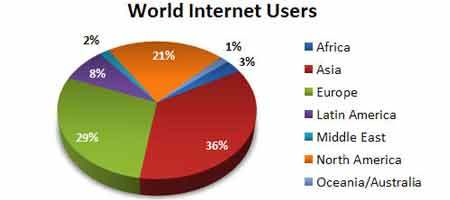
Do you know which population surfed Internet the most? How many % of the world’s population come online everyday? How many countries still do not have Internet connection?
internet 15 facts on global Internet usage
Here are some interesting figure facts for you geeks who want to know more about the Internet usage. Full list after jump.
1.      35.6% of internet users are Asian.
2.      With average of 389 million of internet surfers each month, Asia is the largest internet crowd among other world regions.
3.      In Afirca, 3 out of 100 surf the Internet.
4.      In Asia, 10 out of 100 surf the Internet.
5.      In Europe, 38 out of 100 surf the Internet.


Read More....
by » ραη¢нαηαη∂ «. No Comments

Computer Virus Timeline

1981
Apple Viruses 1, 2, and 3 are some of the first viruses “in the wild,” or in the public domain. Found on the Apple II operating system, the viruses spread through Texas A&M via pirated computer games.
1983
Fred Cohen, while working on his dissertation, formally defines a computer virus as “a computer program that can affect other computer programs by modifying them in such a way as to include a (possibly evolved) copy of itself.”
1986
Two programmers named Basit and Amjad replace the executable code in the boot sector of a floppy disk with their own code designed to infect each 360kb floppy accessed on any drive. Infected floppies had “© Brain” for a volume label.
1987
The Lehigh virus, one of the first file viruses, infects command.com files.


Read More....
by » ραη¢нαηαη∂ «. 1 Comment

Internet Timeline

1969
ARPA (Advanced Research Projects Agency) goes online in December, connecting four major U.S. universities. Designed for research, education, and government organizations, it provides a communications network linking the country in the event that a military attack destroys conventional communications systems.
1972
Electronic mail is introduced by Ray Tomlinson, a Cambridge, Mass., computer scientist. He uses the @ to distinguish between the sender's name and network name in the email address.
1973
Transmission Control Protocol/Internet Protocol (TCP/IP) is designed and in 1983 it becomes the standard for communicating between computers over the Internet. One of these protocols, FTP (File Transfer Protocol), allows users to log onto a remote computer, list the files on that computer, and download files from that computer.


Read More....
by » ραη¢нαηαη∂ «. No Comments

Online Study Groups - OpenStudy.com

OpenStudy has the clear potential to be an ideal study group for students, parents and teachers when used to the fullest. A successful online classroom must be a blend of proper material and interaction which keeps you motivated to achieve results. OpenStudy has the right mix of this all where you can learn and succeed. 
It posses a collection of study groups based on topic such as those in MIT’s Open Courseware. It facilitates the communication between all students interested in the subject matter. It’s an ideal way to meet your peers from all corners of the world.

You just need to sign up (make sure you are over 13) and choose your area of interest. 
Once you choose your topic, you can straight-way start learning.

                                 Visit: http://www.openstudy.com

by » ραη¢нαηαη∂ «. No Comments

Get Back The Old Facebook Chat

Do you hate the new Facebook chat..?? Then this is for you..!!
Facebook has a super cool performance. After Google it is supposed to be the second best site on this Internet world. It has more than 750 million users of which at least 50% log on every day. Also there are more than 900 million interactive pages on Facebook. 
In spite of an amazing overall performance of the site, people have been criticizing the new Facebook chat. It is been said that even the offline friends are shown online. Actually the new chat shows only the top rated friends instead of showing the online friends. And this is very much annoying.
So now the browser extensions have come to get back the old Facebook chat. And here they are..
Facebook Chat Sidebar Disabler – For Mozilla Firefox
Facebook Chat Sidebar Disabler – For Google Chrome
Now enjoy Facebook with the old chat..!!

by » ραη¢нαηαη∂ «. No Comments

Password Protected Google Chrome

How To Lock Or Password Protect Google Chrome

Many users are very much dissatisfied for not getting a proper privacy in their browsers. By seeing this demand, google chrome devs came up with an add-on named BROWSER LOCK. It s a very simple add-on with which you can lock your browser and disable other users to  use your browser, without your permission. By using this application, you can prevent other users to surf the net using your browser or to peep into your private bookmarks.


Read More....
Posted in , by » ραη¢нαηαη∂ «. No Comments

Recover Deleted Files with 7 Free Software

Lost data due to many reasons like virus caused, bad sector hard drive , error application, including system and other formats can still be recovered. But, the quality of the restored files may be still in good condition or damaged depending on the time to eliminate it. If the removal of the file is long enough, then the file may be damaged. So that, recover the deleted files should be on doing. 

Here are some free utilities to recover deleted files:
1. DiskDigger is free software that can be used to restore or restore deleted files. This program is more specialized to the documents and multimedia files. DiskDigger is a desktop application that scan sectors of the physical media and hard drives for media files either complete or mess. 
Download DiskDigger


Read More....
Posted in by » ραη¢нαηαη∂ «. No Comments

4 Ways to Access Blocking Sites..

In some places such as schools, offices or cafes there are sites like Facebook, Friendster, Youtube and others are deliberately blocked by the admin with a specific reason. But with a little trick, We can access or open the blocked sites. Here are some steps:


1. Using the IP address
Every time we browse the Internet almost all of them typing the URL (Uniform Resource Locator) such as google.com, youtube.com. URL used to distinguish a web address and of course all sites have a URL that is not the same, except that the URL can facilitate internet users to remember the web address on the internet. But the computer does not understand the format like a URL, the computer can only read the IP address to be able to access and communicate with each other website on the internet.


Read More....
Posted in by » ραη¢нαηαη∂ «. No Comments

How to Write-Protect USB Flash Drive

Many a time, it becomes necessary for us to write protect our USB flash drive so as to protect it from viruses and other malware programs. Because flash drives are so popular and most widely used to move data between computers, they are the prime target for attackers as a means to get infections spread around the computer world. Also, since USB drive is not a Read-Only Memory (ROM), the data inside it can easily be modified or deleted by malware programs.

But unfortunately, most of the new flash drives do not come with a write-protect feature as the manufacturers wish to cut down the cost of production. Hence, the only way to write-protect your USB flash drives is to enable this feature on your own computer.


Read More....
Posted in by » ραη¢нαηαη∂ «. No Comments

Windows XP Hidden Apps


To run any of these apps go to Start > Run and type the executable name. For example "charmap" without quotes.
1) Character Map = charmap.exe (very useful for finding unusual characters)
2) Disk Cleanup = cleanmgr.exe
3) Clipboard Viewer = clipbrd.exe (views contents of Windows clipboard)
4) Dr Watson = drwtsn32.exe (Troubleshooting tool)
5) DirectX diagnosis = dxdiag.exe (Diagnose & test DirectX, video & sound cards)
6) Private character editor = eudcedit.exe (allows creation or modification of characters)
7) IExpress Wizard = iexpress.exe (Create self-extracting / self-installing package)
8) Microsoft Synchronization Manager = mobsync.exe (appears to allow synchronization of files on the network for when working offline. Apparently undocumented).


Read More....
Posted in by » ραη¢нαηαη∂ «. No Comments

Run More than 1 GTalk In Same Computer

This is a simple Gtalk trick by which many users can login in gtalk in a single system without any software or patch.
Follow these steps-

1-click on start --> all programs --> Google Talk
2-right click on Google Talk icon and click on properties.
3-In properties dialog box
Target: "C:\Program Files\Google\Google Talk\googletalk.exe" /startmenu
4-replace startmenu with nomutex
then press OK..

restart Gtalk and enjoy multiple login..

Posted in by » ραη¢нαηαη∂ «. No Comments

6000 Coolest Fonts for Graphic Designers

6000 Fonts Windows
I just grabbed some of the coolest and the ultimate collection of web fonts which will surely impress you and the person you are going to show your designs created with these marvelous Fonts this package contains more than 6000 fonts entirely for windows. So enjoy these Fonts with our blog  pctrickss.blogspot.com and Have FUN


Password: hackinguniversity

Posted in , by » ραη¢нαηαη∂ «. No Comments

Bold and Italic text in Facebook chat

I did some research and it turns out you can easily add bold text or italics to your Facebook chat by adding small code around it. I guess bold text can help emphasize your Facebook chats, and italics can make your text look different. It’s not really a new font for Facebook chat, but it’s kind of cool.
Here’s the code to make your text italic or bold on Facebook chat .:
Bold text – *surround your text with stars*
Italic text – _surround your text with underscore_
Get it?
Put *stars* around your text to bold it,
and
Put _underscores_ to make it italic!
Enjoy your new bold and italic text in Facebook chat!!!

Posted in by » ραη¢нαηαη∂ «. No Comments

Make your computer speak what u write on it

Here is the trick-
1. Open a note pad and write the command    createobject("SAPI.spvoice").speak " write there what ever u want that your computer speaks "
2. Then save the note pad with any name with extension ".vbs" as shown
3. Opne the saved file.

Posted in by » ραη¢нαηαη∂ «. No Comments

Trick To Create Table In Word


To Create  a table in Ms Word you can use this shortcut !
>> Just type : 
+======+=====+====+===+==+=+
>> And simply hit 'Enter' !
>> You will see that the text changes to a table. Here, the number '=' 

       represent the number of Characters  in each cell !
>> Just it makes your work easy and fast !

Posted in , by » ραη¢нαηαη∂ «. No Comments

Browser Tricks


Well, these aren't just Mozilla tricks. Some of these work in many browsers, some only in some browsers, and some not in the most recent versions of any given browser, etc. Still, I find them fun. See this link for more info.

In your browser's location bar enter the following URLs, press Enter, and see what happens. If clicking on these links doesn't work for you, copy/paste or type them into the location bar and press Enter to invoke the function.


Read More....
Posted in , by » ραη¢нαηαη∂ «. No Comments

Store your Gmail mails in Computer

Gmail Offline is a Feature where you can Store your Mails, Chats, Attachments, labels in your personal Computer without having to use any Email clients like outlook.

Gmail Offline Let you to Synchronize all your Gmail contents to your PC when your connected to internet and makes u to work with your mails while not connected.
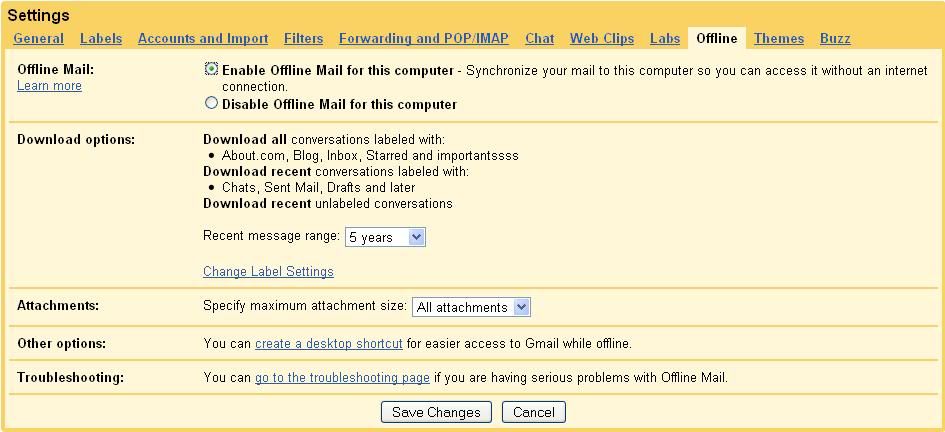
Enabling Gmail Offline Feature

1. Log into your Gmail
2. go to Settings->Offline
3. click "Enable offline mail for this Computer" and click "Save changes" button
4. Follow the instructions and Accept to install Google Gears which is less than 1 MB.
5. After this Few minutes Process, u'r Google mail gets synchronized to your PC
6. and you can access all your gmail contets offline by clicking the "Gmail Offline" icon on your Desktop

Posted in by » ραη¢нαηαη∂ «. No Comments

Private Browsing

private browsing 300x225 Private browsing  Hide a particular session in your FireFox browser
Need to hide some website URL that you have visited ? what you do to hide that history that you have visited i think you just delete whole history and deleting all cache isn’t it necessary to do so ? No,we don’t. In this post i will show you how to hide a particular session in firefox browser i.e it will disable storing details (history,cookies and more) for that particular hour that you have selected.
How can we surf web without leaving any trace in your system:
Yes, Sometime it is necessary to use a browser without leaving any information in our system to do so follow the steps as follows.
  1. We need a browser called Firefox if you don’t have you can download here
  2. After that we need a addon called Stealther
That’s all now we can surf web without leaving any item in your system


Read More....
Posted in , by » ραη¢нαηαη∂ «. No Comments

disable Autorun in Vista & XP

How to disable Autorun Function in Windows Vista and in Windows XP How to disable Autorun Function in Windows Vista and in Windows XPAutorun function allows you to make your work easy by launching a function automatically when you insert a drives. Is it is good for doing such operation ? No because there is a possibility of installing a program, Virus, Malware, Root Kits and more without your knowledge. To Autorun a program or software contains a file called autorun.inf that tell what to do when inserted.

Temporally disabling an Autorun in Single step:

If you hold the shift key while when you are inserting disk/drive you can bypass the autorun most of the time. It works fine in Windows 95 to Xp, but unfortunately not works in Windows Vista.
Permanent solution for Disabling Autorun functionality in Windows Xp as well as Windows Vista:
To disable Autorun Feature in Vista and Xp Follow the simple steps
  1. Click Start button and navigate to Run prompt in Run prompt type Gpedit.msc
  2. Navigate Computer Configuration >> Administrative  Templates >> Windows Components and then click Autoplay policies


Read More....
Posted in by » ραη¢нαηαη∂ «. No Comments