
Archive for 04/28/11
Here is a quick summary of what I’ve found so far for Windows 7:Window Management- Win+Left Arrow and Win+Right Arrow: Dock a window to the left or right half of the screen.
- Win+Shift+Left Arrow and Win+Shift+Right Arrow: Move a window from one monitor to another, keeping them in the same relative location to the monitor’s top-left origin.
- Win+Up Arrow and Win+Down Arrow: Maximizes and restores/minimizes a window.
- Win+Shift+Up Arrow and Win+Shift+Down Arrow: Maximizes and restores the vertical size of a window.
- Win+Home: Minimize all the non-active background windows, keeping the window you’re using in its current position. (Press Win+Home again to restore the windows to their original locations.)
- Win+(plus key) and Win+(minus key): Zoom in or out using Windows Magnifer.
- Win+E: Opens Windows Explorer.
- Win+U: Opens the Ease of Access Center.
- Win+D: Show/hide the desktop.
- Win+F: Opens the Search Results window.
- Win+L: Locks the computer.
- Win+B: Sets focus to the “Show hidden icons” button on the task bar.
- Win+Left Arrow and Win+Right Arrow: Dock a window to the left or right half of the screen.
Posted in
OS_tricks
by .


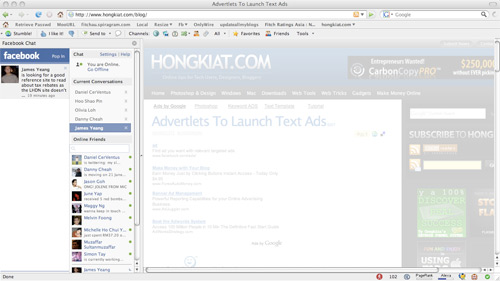
Facebook Chat is cool, at least it allows you to send instant messages to online Facebook contacts. However I’m not really a fan of the chat bar being at the bottom of the page, what if I’ve left Facebook but still wants to remain chatting with my Facebook contacts? If you are using Firefox, you can place the Facebook Chat at the sidebar.
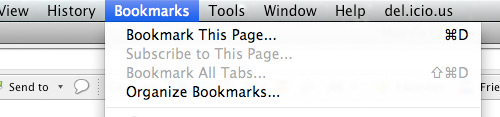
Step 1
Look for Bookmarks on the top navigation. Select Organize Bookmarks…
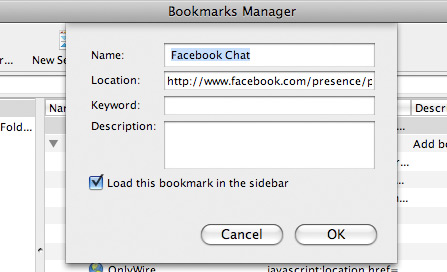
Step 2
Click New Bookmark... tab and enter the following:
- Name: Facebook Chat
- Location: http://www.facebook.com/presence/popout.php
- Check Load this bookmark in sidebar.
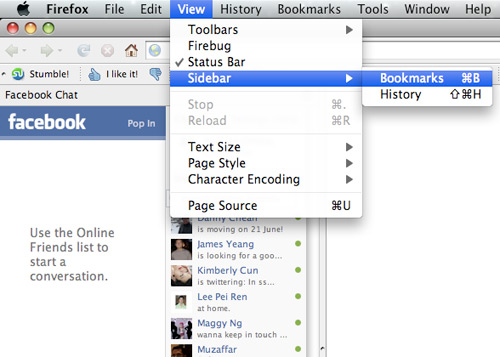
Step 3
Launch the Firefox sidebar, click Facebook Chat and start chatting with your Facebook contacts within Firefox.
Posted in
Internet_tricks,
Mozilla
by .


