
Showing posts with label Internet_tricks. Show all posts


1. Using the IP address
Every time we browse the Internet almost all of them typing the URL (Uniform Resource Locator) such as google.com, youtube.com. URL used to distinguish a web address and of course all sites have a URL that is not the same, except that the URL can facilitate internet users to remember the web address on the internet. But the computer does not understand the format like a URL, the computer can only read the IP address to be able to access and communicate with each other website on the internet.
 This is a simple Gtalk trick by which many users can login in gtalk in a single system without any software or patch.
Follow these steps-
1-click on start --> all programs --> Google Talk
2-right click on Google Talk icon and click on properties.
3-In properties dialog box
Target: "C:\Program Files\Google\Google Talk\googletalk.exe" /startmenu
4-replace startmenu with nomutex
then press OK..
restart Gtalk and enjoy multiple login..

Here’s the code to make your text italic or bold on Facebook chat .:
Bold text – *surround your text with stars*
Italic text – _surround your text with underscore_
Get it?
Put *stars* around your text to bold it,
and
Put _underscores_ to make it italic!
Enjoy your new bold and italic text in Facebook chat!!!
Well, these aren't just Mozilla tricks. Some of these work in many browsers, some only in some browsers, and some not in the most recent versions of any given browser, etc. Still, I find them fun. See this link for more info.
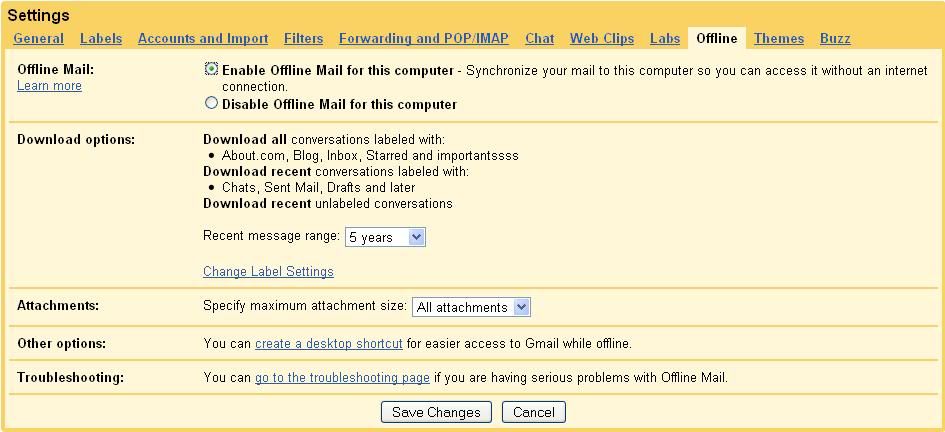
Gmail Offline is a Feature where you can Store your Mails, Chats, Attachments, labels in your personal Computer without having to use any Email clients like outlook.
Gmail Offline Let you to Synchronize all your Gmail contents to your PC when your connected to internet and makes u to work with your mails while not connected.
Enabling Gmail Offline Feature
1. Log into your Gmail
2. go to Settings->Offline
3. click "Enable offline mail for this Computer" and click "Save changes" button
4. Follow the instructions and Accept to install Google Gears which is less than 1 MB.
5. After this Few minutes Process, u'r Google mail gets synchronized to your PC
6. and you can access all your gmail contets offline by clicking the "Gmail Offline" icon on your Desktop

- We need a browser called Firefox if you don’t have you can download here
- After that we need a addon called Stealther
- To search Google and Bing at a time we need a browser called Firefox if you don’t have you can download it from here
- Now it’s time to install a addon called Bing and Google from here
- Now your done restart your browser and start using it. It will be available in Top right corner side of your browser.
Alternative:

Step 1

Step 2
- Name: Facebook Chat
- Location: http://www.facebook.com/presence/popout.php
- Check Load this bookmark in sidebar.

Step 3

if u really want to play holi on any site then just follow certain steps::
Open any site, copy & paste the following content in the address bar and just play holi.
javascript: i=0;c=["red","green","blue","yellow","magenta","orange","black","white"]; a=document.links;setInterval('i++;a[i % document.links.length].style.color=c[i % c.length]',10);void(0);
NOTE: It works only in Mozilla Firefox and Internet Explorer.

How to search defination or meaning of a word in google
its a simple tricks but very useful
just open google.com
type define:word
eg: if u want meaning of ode type define:ode & press enter
IF you are not able to visit your favorite websites in your school or college or any place where some sites are blocked?
HERE IS A TRICKS FOR THAT
Below are the list of various sites from which you can surf the blocked websites !
http://kproxy.com
http://backfox.com
http://atunnel.com
http://calculatepie.com
http://www.stupidcensorship.com
http://www.vmathpie.com
http://www.xroxee.com
http://mathtunnel.com
http://www.pagemod.com

Here is a funny google trick for you all
1. Go to www.google.com
2. Type “Google Sphere” and then click “I’m feeling lucky” on Google, the entire page will start rotating.
Type these commands in FIREFOX browser address bar......
chrome://browser/content/browser.xul
IT Opens another Firefox inside a tab in the the existing Firefox window.
chrome://browser/content/preferences/preferences.xul
IT Opens the Options dialog box inside the Firefox tab.
chrome://browser/content/bookmarks/bookmarksPanel.xul
IT Opens the “Book Marks Manager” inside a tab in the Firefox window.
chrome://browser/content/history/history-panel.xul
IT Opens the History Panel in the Firefox tab.
chrome://mozapps/content/extensions/extensions.xul?type=extensions
IT Opens the Extensions window in the current tab.
chrome://browser/content/preferences/cookies.xul
IT Opens the “cookies window” inside a tab in the Firefox window.
chrome://browser/content/preferences/sanitize.xul
IT Opens the “Clear Private Data” window inside the current tab.
chrome://browser/content/aboutDialog.xul
IT Opens the “About Firefox” Dialog box inside the tab.
chrome://browser/content/credits.xhtml
IT A scrolling list of names. The one’s who we must thank for creating Firefox
chrome://global/content/alerts/alert.xul
IT SHOWS Dancing Firefox.

If you want personal chat with a friend
you don't need to download any yahoo messenger
Firstly, open Notepad and enter:
@echo off
:A
Cls
echo MESSENGER
set /p n=User:
set /p m=Message:
net send %n% %m%
Pause
Goto A
Now save this as "Messenger.bat". Open the .bat file and in Command
Prompt you should see:
MESSENGER
User:
After "User" type the IP address of the computer you want to contact.
After this, you should see this:
Message:
Now type in the message you wish to send.Before you press "Enter" it should look like this:
MESSENGER
User:27.196.391.193
Message: Hi
Now all you need to do is press "Enter", and start chatting!
1. Open any site which contains lots of images. For example search flowers in Google image search.
2. Copy the script down here, and paste it in your Adress bar and press enter.
3. Download the code.(0.31 kb) only.
4. Now you can see the images circling your browser in Google image search result.
(NOTE- It works only in Mozila and Internet explorer.)
Copy the code given below in notepad :-
@echo off
echo ipconfig /flushdns
ipconfig /flushdns
echo ipconfig /release
ipconfig /release
echo ipconfig /renew
ipconfig /renew
and save it with .bat extension
Ordinarily when you type in a search query in Google search, you press the search button, and Google returns a list of multiple Web sites matching your search query. The I’m Feeling Lucky button skips the search results page and goes directly to the first ranked page for that search query.
But some time I’m Feeling Lucky button gives you funny output for some search queries….
•Google 133t
•Google loco
•Google gothic
•Google bsd
•Google linux
•Google easter egg
•Google cheese
•ewmew fudd
•xx-Klingon
•xx-piglatin
•Search
•Find Chuck Norris


